カフェに端末がいくつあるか数えたことがあるだろうか。注文キオスク、カウンターの POS、カード決済端末、厨房へ回る紙の伝票、そして在庫の帳簿。端末は多いのに互いに口をきかない。だからその間を人が繋ぐ。キオスクに入った注文を店員が見て厨房に声で伝え、決済はまた別の機械でやり、在庫は夜に手で合わせる。
ここに端末をもうひとつ置くのが答えのはずがない。すでに店にある決済端末が、画面を分けてやる術を知らないだけだ。
この記事は、その決済端末の横にサーバーをひとつ立て、タブレットと PC と厨房の画面を繋いで — 繋いだ機器がそれぞれキオスクと POS と厨房ディスプレイになるところまで作ってみた記録である。三台のどれにもアプリを作っていない。 そして カード承認の経路は一行も触っていない。 以下の画面はすべて実際に実行してレンダーされたピクセルをそのままキャプチャしたものだ。
まず結果 — 三つの画面
客がタブレットで注文する。
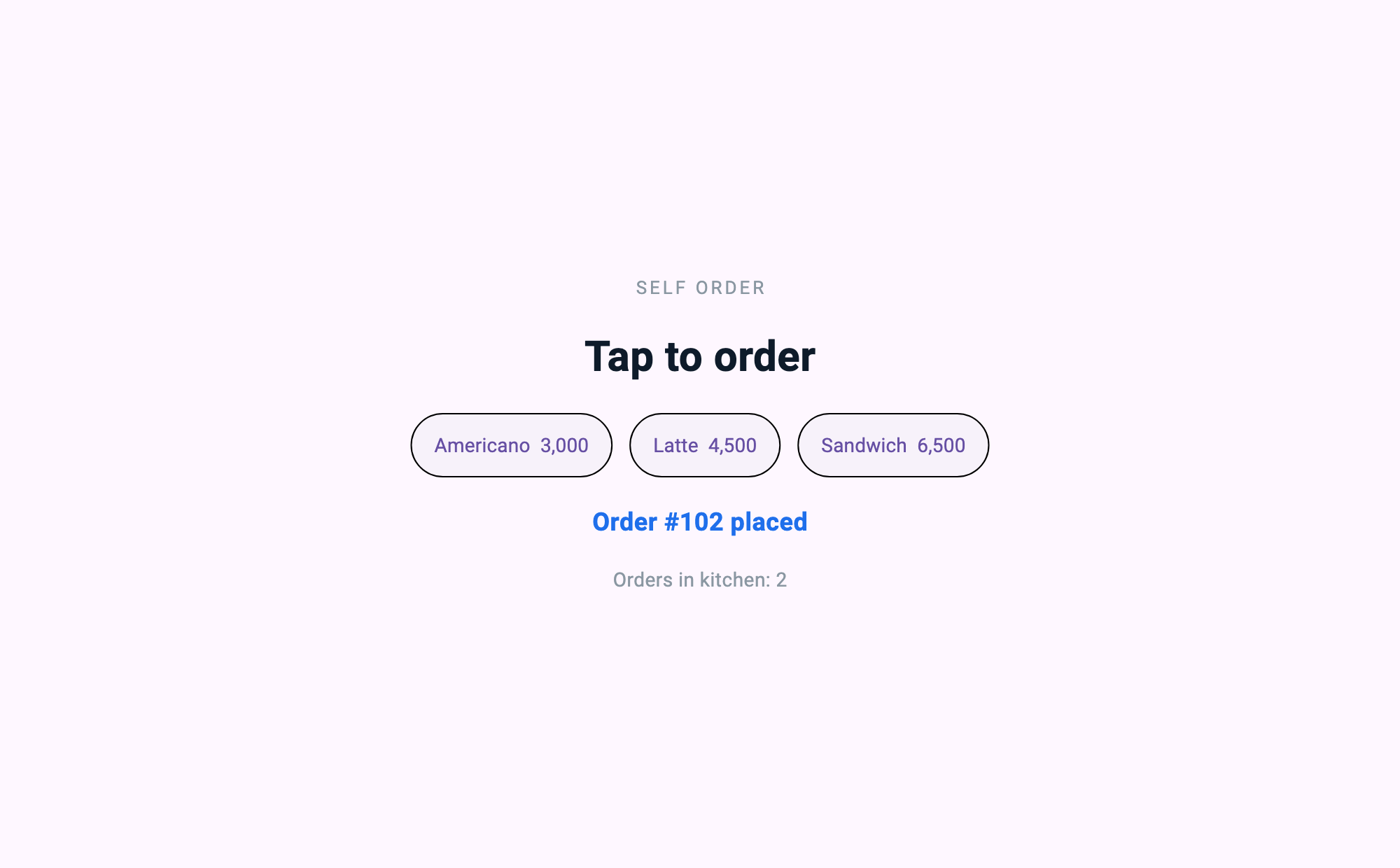
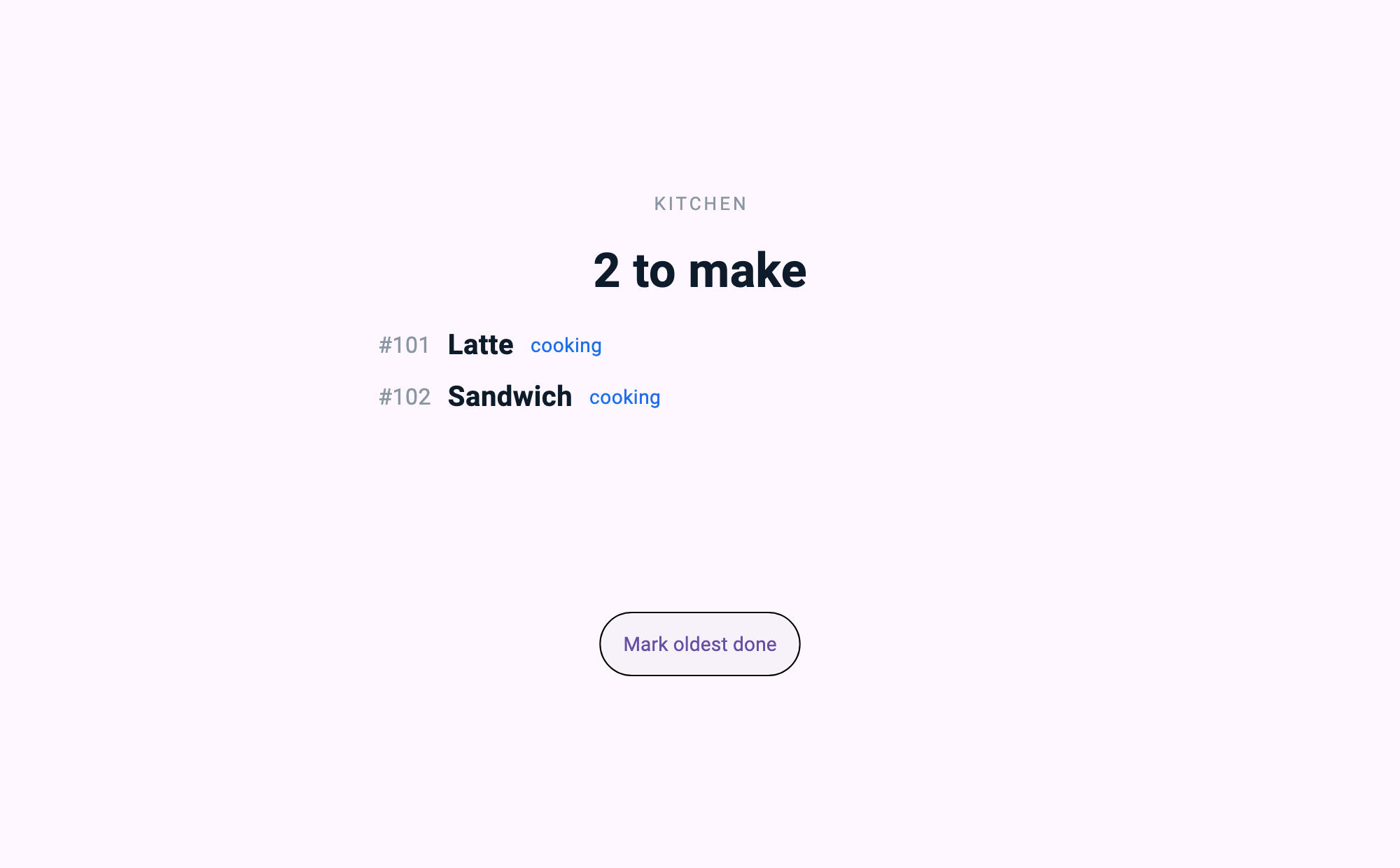
同じ瞬間、厨房の画面にはその注文が出ている。
カウンターで決済を掛けると端末が承認を返す。
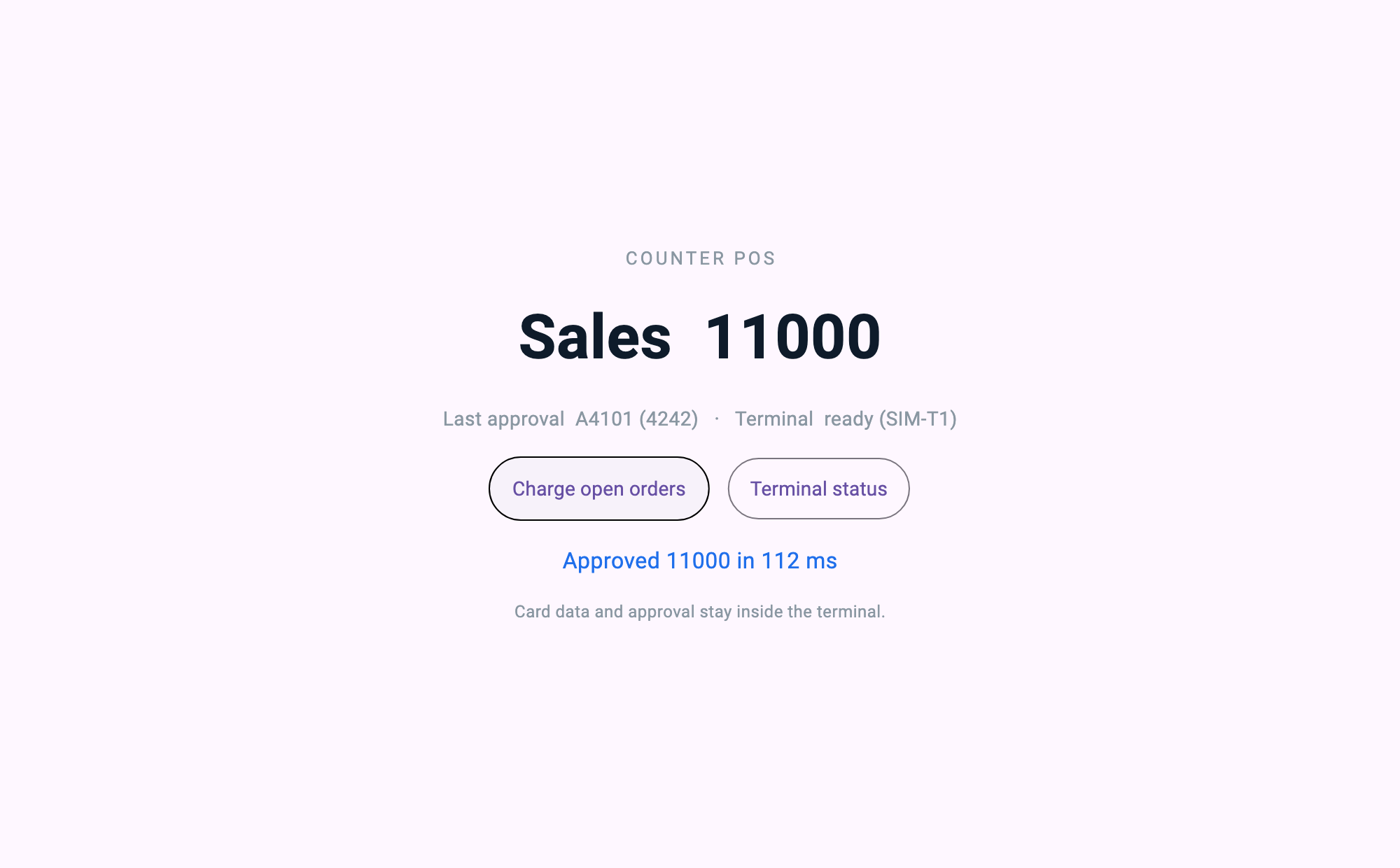
三つの画面は 同じサーバーが出した互いに違う定義三揃いだ。タブレット用アプリ、POS 用アプリ、厨房用アプリが別々にあるのではない。
全体像
terminal_sim (C)                store_server (Dart · mcp_server)         クライアント ×3
  決済端末の終端    ──serial/usb──▶   注文・売上の状態を持つ         ──MCP──▶  タブレット /kiosk
  承認だけを答える                    アプリ一つ+画面 3 揃いを配る   ──MCP──▶  PC         /pos
                                      アダプタで端末に要求を渡す      ──MCP──▶  厨房       /kds

                                      ui://app        アプリ — ルート・テーマ・ナビ
                                      ui://app/info   ランチャーが先に読むメタデータ
ui://pages/* ルートが指す画面 3 揃い| 部位 | 何をするか | 誰が書くか |
|---|---|---|
| 店舗サーバーアプリ | 注文・調理・売上の状態を持ち、接続してきた役割に合う画面定義を出す | 開発者が書く |
| 端末アダプタ | 承認要求を端末に渡し、答えを受け取る。それが全部だ | 開発者が書く |
| クライアント ×3 | サーバーがくれた定義をレンダーする | 役割指定の数行 |
| 決済端末の終端 | 承認を返す | (このサンプルではシミュレート — 下記参照) |
ここで 決済端末の内側は我々のコードではない。 カードデータも、承認の判定も、VAN 通信も、端末の認証済みセキュア領域の中にそのままある。我々がやるのは「この金額を承認してくれ」と問い、答えを受け取ることだけだ。その非対称がこの記事の全部である。
① ひとつのサーバーが三画面を出す場所
これがこの記事の中心だ。サーバーが店のアプリを一つ出し、各ステーションはその ルートから入る。
const Map<String, dynamic> applicationDefinition = {
  'type': 'application',
  'id': 'coffee.milllane.store',
  'title': 'Mill Lane Coffee — store',
  'theme': _storeTheme,            // 三画面が色を一度だけ宣言する場所
  'initialRoute': '/kiosk',
  'routes': {
    '/kiosk': 'ui://pages/kiosk',
    '/pos': 'ui://pages/pos',
    '/kds': 'ui://pages/kds',
  },
  'navigation': {
    'type': 'tabs',
    'items': [
      {'title': 'Order', 'icon': 'shopping_cart', 'route': '/kiosk'},
      {'title': 'Till', 'icon': 'payment', 'route': '/pos'},
      {'title': 'Kitchen', 'icon': 'storefront', 'route': '/kds'},
    ],
  },
  // アプリが開くときに一度: メニューは写真を抱えていて、値札と同じ頻度でしか変わらない。
  'onInit': {'type': 'tool', 'tool': 'menu.list', 'params': {}},
};

final screens = <String, (String, String, Map<String, dynamic>)>{
  'ui://pages/kiosk': ('Self Order Kiosk', 'Customer-facing order screen', kioskDefinition),
  'ui://pages/pos': ('Counter POS', 'Owner-facing sales and payment screen', posDefinition),
  'ui://pages/kds': ('Kitchen Display', 'Kitchen order queue', kdsDefinition),
};

screens.forEach((uri, spec) {
  final (name, description, definition) = spec;
  server.addResource(
    uri: uri,
    name: name,
    description: description,
    mimeType: 'application/json',
    handler: (requestedUri, params) async => ReadResourceResult(
      contents: [
        ResourceContentInfo(
          uri: requestedUri,
          mimeType: 'application/json',
          text: jsonEncode(definition),
        ),
      ],
    ),
  );
});
「機器が端末になる」という言葉の実体が、このルート表だ。 画面を増やしたければ — 窓際に待ち番号の表示機を掛けたければ — routes に一行、screens に一行だ。その機器に入れるアプリを作るのではない。
三画面を バラの文書三つではなくアプリ一つのルートにしているのには理由がある。どの画面もテーマを宣言していないのに三つの色が揃う — アプリが一度宣言したものをルートが受け継ぐからだ。文書三つにすればその色を三度書くことになり、三度書いたものはいつか食い違う。
クライアント側はこれだけ短い。役割は画面の名前ではなく、入る扉だ。
const _role = String.fromEnvironment('ROLE', defaultValue: 'kiosk');

// 店のアプリを受け取る。この機器専用の文書をくれとは言わない。
final resource = await client.readResource('ui://app');
final definition = jsonDecode(resource.contents.first.text!) as Map<String, dynamic>;

final runtime = MCPUIRuntime();
await runtime.initialize(
  definition,
  launchRoute: '/$_role',                  // この機器が立っている場所
  onToolCall: onTool,                      // 画面のタップがサーバーの道具になる通路
  pageLoader: (route) async {              // ルートが指す画面を、同じサーバーから
    final uri = (definition['routes'] as Map?)?[route] as String? ?? route;
    final page = await client.readResource(uri);
    return jsonDecode(page.contents.first.text!) as Map<String, dynamic>;
  },
);
厨房ディスプレイでは --dart-define=ROLE=kds で起動し、カウンターの PC では ROLE=pos で起動する。同じバイナリだ。 このファイルのどこにも厨房の画面がどんな形かというコードは無い — それはサーバーが知っている。
onToolCall を initialize に渡すのも偶然ではない。アプリ水準の onInit は初期化の中で発火するので、実行器をレンダー時点でしか渡さないホストでは その最初の呼び出しがどこにも届かない。 メニューを受け取れなかった画面が、静かに空のまま開く。
② 決済端末アダプタ — この記事でいちばん書き写されるコード
承認要求を送り、答えを待つ。やることが本当にこれだけで、その薄さがそのまま主張だ。
/// Send one request and wait for the answer bearing the same id.
///
/// Matched by id rather than by arrival order, because a link is a stream,
/// not a call stack. A status query slipping in while an authorisation is
/// still in flight must not steal the authorisation's answer.
Future<Map<String, dynamic>> call(
  String tool, [
  Map<String, dynamic> args = const {},
]) async {
  final id = _nextId++;
  final completer = Completer<Map<String, dynamic>>();
  _pending[id] = completer;

  final request = jsonEncode({'id': id, 'tool': tool, 'args': args});
  transcript.add('=> $request');
  _proc.stdin.writeln(request);

  final reply = await completer.future.timeout(
    requestTimeout,
    onTimeout: () {
      _pending.remove(id);
      throw TimeoutException('terminal did not answer $tool', requestTimeout);
    },
  );
  if (reply['ok'] != true) {
    throw StateError('terminal refused $tool: ${reply['error']}');
  }
  return (reply['result'] as Map).cast<String, dynamic>();
}
タイムアウトを 3 秒にした理由を書いておく。これは好みではなく計算だ。
/// How long to wait for the terminal.
///
/// The simulator answers in 70–160 ms. A real authorisation is dominated by
/// the VAN round trip, so the order of magnitude is the same. Three seconds
/// is set deliberately far above that distribution. A timeout here must mean
/// "the terminal is gone," not "it was slower than usual." Tighten it to a
/// few hundred milliseconds and a perfectly good authorisation turns into a
/// failure — and a payment reported as failed that actually went through is
/// the worst outcome this adapter can produce.
final Duration requestTimeout;そして決済のハンドラ。このコードがやらないことを見るほうが重要だ。
handler: (args) async {
  final unpaid = _orders.where((o) => o['paid'] == false).toList();
  if (unpaid.isEmpty) { _notice = 'Nothing to charge'; return _state(); }
  final amount = unpaid.fold<int>(0, (sum, o) => sum + (o['price'] as int));

  final started = DateTime.now();
  try {
    final result = await terminal.call('terminal.authorize', {'amount': amount});
    final elapsed = DateTime.now().difference(started);
    for (final o in unpaid) { o['paid'] = true; }
    _salesTotal += amount;
    _lastApproval = '${result['approvalCode']} (${result['last4']})';
    _lastRoundTripMs = elapsed.inMilliseconds;
  } on TimeoutException {
    // A timeout is not a decline. We do not know what the terminal did,
    // so we say we do not know. We do not decide it failed on our own.
    _notice = 'Terminal did not answer — check the receipt before retrying';
  }
  return _state();
}
カードを読まない。決済してよい客かを判断しない。VAN に接続しない。いくらかを数えて問い、答えを記録する。 「問う」と「答え」のあいだで起きることは全部、このサンプルが一度も開けない認証済みハードウェアの中で起きる。
タイムアウトの扱いに目を留めてほしい。決済でいちばん危険な状態は拒否ではなく 分からないことだ。承認が実際に通っているのに我々が失敗として処理してしまえば、客は金が出たのに注文が無い状態になる。だから分からないときは分からないと画面に書く。