你数过一间咖啡馆里有多少台终端吗?点单机、柜台 POS、刷卡机、送去后厨的纸单,还有库存台账。终端不少,彼此却不说话。于是中间靠人来接。店员看着点单机进来的单子朝后厨喊一声,收款在另一台机器上做,库存晚上再手工对。
再往里塞一台终端,不可能是答案。只是店里本来就有的那台收款终端,不会把画面分出来而已。
这篇文章记录的,是在那台收款终端旁边立一个服务端,把平板、PC 和后厨屏接上去 —— 直到接上来的机器各自变成自助点单机、POS 和后厨显示为止。三台机器一个 App 都没做。 而且 刷卡授权那条路一行都没碰。 下面每一张画面,都是真实运行后渲染出来的像素原样截取的。
先看结果 —— 三块画面
客人在平板上点单。
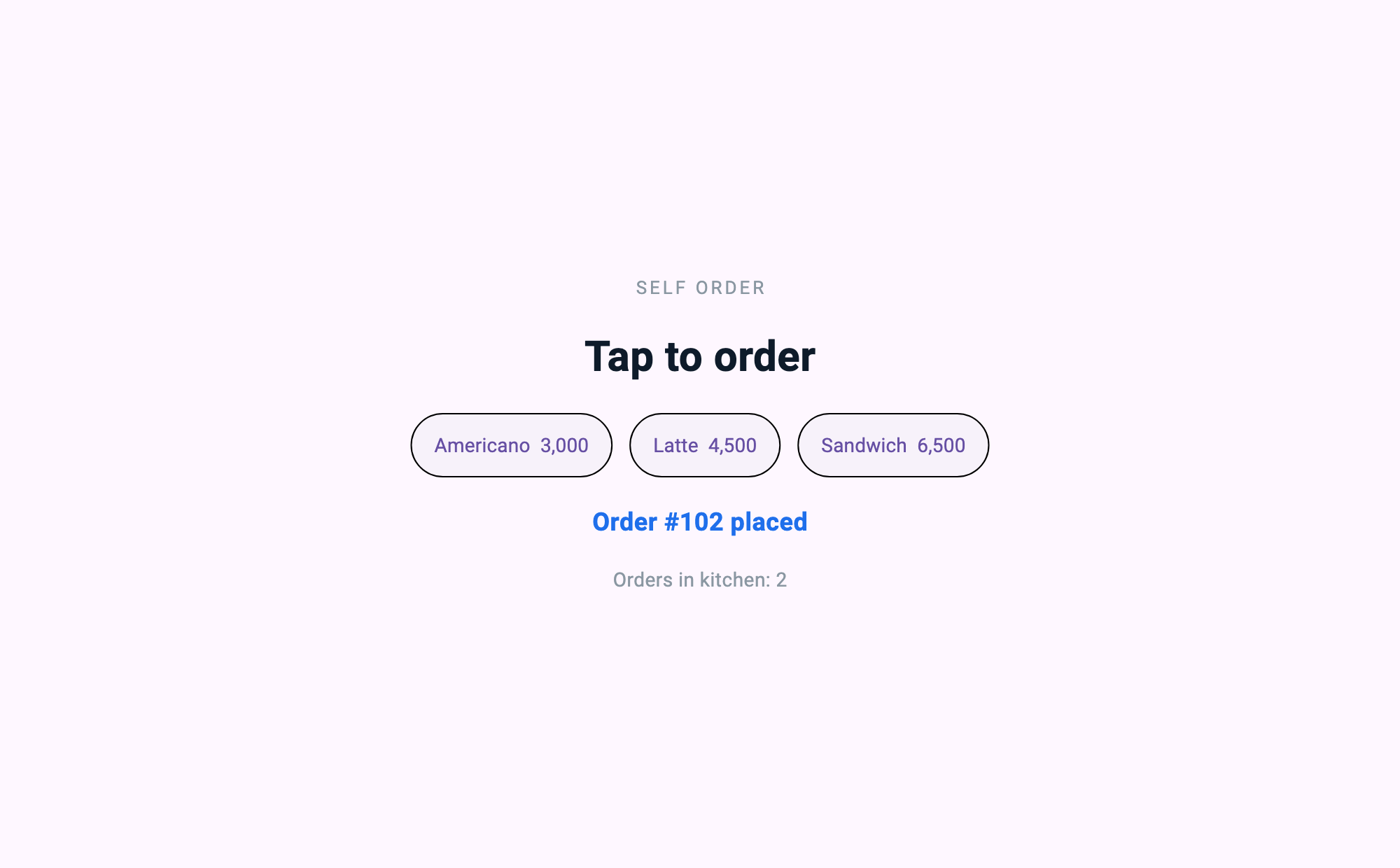
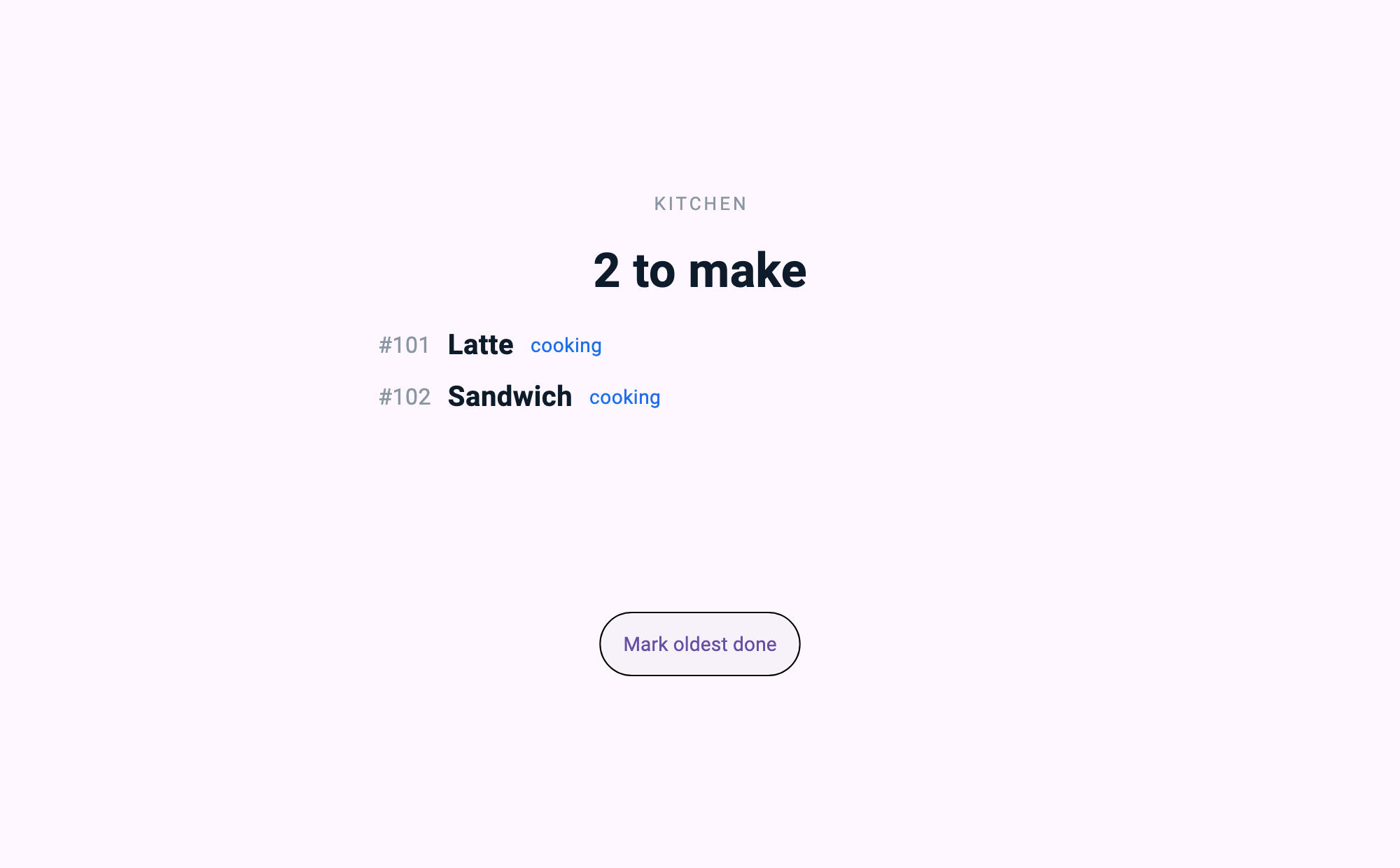
同一时刻,后厨屏上已经挂着这两单。
在柜台发起收款,终端返回授权。
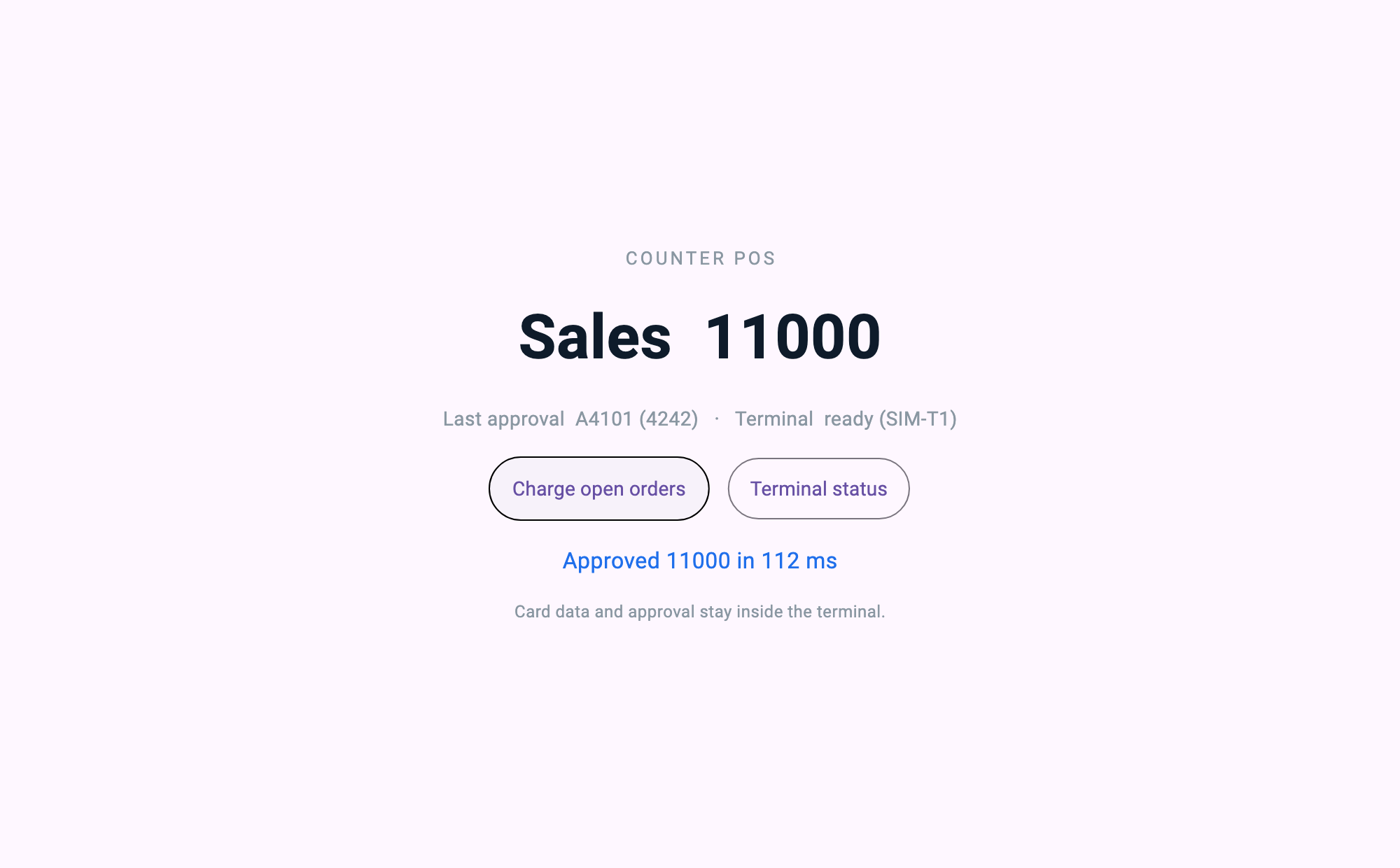
三块画面是 同一个服务端给出的三份不同定义。并不存在平板专用 App、POS 专用 App、后厨专用 App。
全景
terminal_sim (C)                store_server (Dart · mcp_server)         客户端 ×3
  收款终端端点     ──serial/usb──▶   持有订单与销售状态             ──MCP──▶  平板    /kiosk
  只回答授权                          提供一个应用与 3 块画面        ──MCP──▶  PC      /pos
                                      通过适配器把请求转给终端        ──MCP──▶  后厨    /kds

                                      ui://app        应用 —— 路由・主题・导航
                                      ui://app/info   启动器先读的元数据
ui://pages/* 路由指向的 3 块画面| 部件 | 做什么 | 谁来写 |
|---|---|---|
| 门店服务端应用 | 持有订单、出品、销售状态,按接进来的角色给出对应的画面定义 | 开发者写 |
| 终端适配器 | 把授权请求递给终端,再把答案取回来。就这些 | 开发者写 |
| 客户端 ×3 | 渲染服务端给的定义 | 几行角色指定 |
| 收款终端端点 | 返回授权 | (本样例中为模拟 —— 见下) |
这里,收款终端的里面不是我们的代码。 卡数据、授权判定、VAN 通信,都原样待在终端已认证的安全区里。我们做的只是问一句「这笔金额请授权」再接住答案。这个不对称,就是这篇文章的全部。
① 一个服务端给出三块画面的地方
这是本文的中心。服务端给出店铺的一个应用,每个工位从它的某条路由进来。
const Map<String, dynamic> applicationDefinition = {
  'type': 'application',
  'id': 'coffee.milllane.store',
  'title': 'Mill Lane Coffee — store',
  'theme': _storeTheme,            // 三块画面只声明一次颜色的地方
  'initialRoute': '/kiosk',
  'routes': {
    '/kiosk': 'ui://pages/kiosk',
    '/pos': 'ui://pages/pos',
    '/kds': 'ui://pages/kds',
  },
  'navigation': {
    'type': 'tabs',
    'items': [
      {'title': 'Order', 'icon': 'shopping_cart', 'route': '/kiosk'},
      {'title': 'Till', 'icon': 'payment', 'route': '/pos'},
      {'title': 'Kitchen', 'icon': 'storefront', 'route': '/kds'},
    ],
  },
  // 应用打开时取一次:菜单带着照片,改动频率和价目表一样低。
  'onInit': {'type': 'tool', 'tool': 'menu.list', 'params': {}},
};

final screens = <String, (String, String, Map<String, dynamic>)>{
  'ui://pages/kiosk': ('Self Order Kiosk', 'Customer-facing order screen', kioskDefinition),
  'ui://pages/pos': ('Counter POS', 'Owner-facing sales and payment screen', posDefinition),
  'ui://pages/kds': ('Kitchen Display', 'Kitchen order queue', kdsDefinition),
};

screens.forEach((uri, spec) {
  final (name, description, definition) = spec;
  server.addResource(
    uri: uri,
    name: name,
    description: description,
    mimeType: 'application/json',
    handler: (requestedUri, params) async => ReadResourceResult(
      contents: [
        ResourceContentInfo(
          uri: requestedUri,
          mimeType: 'application/json',
          text: jsonEncode(definition),
        ),
      ],
    ),
  );
});
「机器成为终端」这句话的实体,就是这张路由表。 想加一块画面 —— 想在窗边挂一台等号显示屏 —— 就是 routes 一行、screens 一行。不是去做一个装到那台机器上的 App。
把三块画面放成一个应用的三条路由、而不是三份散文档,是有理由的。它们谁都没有声明主题,颜色却是一样的 —— 应用声明了一次,路由继承下来。做成三份文档就要把那套颜色写三遍,而写三遍的东西迟早会不一样。
客户端这侧就这么短。角色不是画面的名字,而是进来的那扇门。
const _role = String.fromEnvironment('ROLE', defaultValue: 'kiosk');

// 取店铺的应用。不去要一份为这台设备做的文档。
final resource = await client.readResource('ui://app');
final definition = jsonDecode(resource.contents.first.text!) as Map<String, dynamic>;

final runtime = MCPUIRuntime();
await runtime.initialize(
  definition,
  launchRoute: '/$_role',                  // 这台设备所站的位置
  onToolCall: onTool,                      // 画面上的一次点击成为服务端工具调用的通道
  pageLoader: (route) async {              // 路由指向的画面,从同一个服务端取
    final uri = (definition['routes'] as Map?)?[route] as String? ?? route;
    final page = await client.readResource(uri);
    return jsonDecode(page.contents.first.text!) as Map<String, dynamic>;
  },
);
后厨屏用 --dart-define=ROLE=kds 启动,柜台 PC 用 ROLE=pos 启动。是同一个二进制。 这个文件里没有任何一行描述后厨画面长什么样 —— 那是服务端知道的事。
把 onToolCall 交给 initialize 也不是随手写的。应用级 onInit 在初始化内部触发,所以在只到渲染时才交出执行器的宿主上,那第一次调用哪儿也到不了 —— 没拿到菜单的画面会安静地空着打开。
② 收款终端适配器 —— 本文最可能被抄走的代码
发一个授权请求,等一个答案。真的就只做这些,而这份「薄」本身就是主张。
/// Send one request and wait for the answer bearing the same id.
///
/// Matched by id rather than by arrival order, because a link is a stream,
/// not a call stack. A status query slipping in while an authorisation is
/// still in flight must not steal the authorisation's answer.
Future<Map<String, dynamic>> call(
  String tool, [
  Map<String, dynamic> args = const {},
]) async {
  final id = _nextId++;
  final completer = Completer<Map<String, dynamic>>();
  _pending[id] = completer;

  final request = jsonEncode({'id': id, 'tool': tool, 'args': args});
  transcript.add('=> $request');
  _proc.stdin.writeln(request);

  final reply = await completer.future.timeout(
    requestTimeout,
    onTimeout: () {
      _pending.remove(id);
      throw TimeoutException('terminal did not answer $tool', requestTimeout);
    },
  );
  if (reply['ok'] != true) {
    throw StateError('terminal refused $tool: ${reply['error']}');
  }
  return (reply['result'] as Map).cast<String, dynamic>();
}
把超时设成 3 秒的理由写下来。这是算出来的,不是口味。
/// How long to wait for the terminal.
///
/// The simulator answers in 70–160 ms. A real authorisation is dominated by
/// the VAN round trip, so the order of magnitude is the same. Three seconds
/// is set deliberately far above that distribution. A timeout here must mean
/// "the terminal is gone," not "it was slower than usual." Tighten it to a
/// few hundred milliseconds and a perfectly good authorisation turns into a
/// failure — and a payment reported as failed that actually went through is
/// the worst outcome this adapter can produce.
final Duration requestTimeout;
然后是收款处理器。看 这段代码不做什么 更要紧。
handler: (args) async {
  final unpaid = _orders.where((o) => o['paid'] == false).toList();
  if (unpaid.isEmpty) { _notice = 'Nothing to charge'; return _state(); }
  final amount = unpaid.fold<int>(0, (sum, o) => sum + (o['price'] as int));

  final started = DateTime.now();
  try {
    final result = await terminal.call('terminal.authorize', {'amount': amount});
    final elapsed = DateTime.now().difference(started);
    for (final o in unpaid) { o['paid'] = true; }
    _salesTotal += amount;
    _lastApproval = '${result['approvalCode']} (${result['last4']})';
    _lastRoundTripMs = elapsed.inMilliseconds;
  } on TimeoutException {
    // A timeout is not a decline. We do not know what the terminal did,
    // so we say we do not know. We do not decide it failed on our own.
    _notice = 'Terminal did not answer — check the receipt before retrying';
  }
  return _state();
}
不读卡。不判断这位客人能不能付。不连 VAN。数清是多少钱,去问,把答案记下来。 「问」和「答案」之间发生的一切,都发生在这个样例从没打开过的已认证硬件里面。
请留意超时的处理。收款里最危险的状态不是被拒,而是 不知道。授权其实已经通过,我们却按失败处理,客人就会钱出去了、单子却没有。所以不知道的时候,就在画面上写不知道。